
ICT PUBLIC HEALTH SAMPLE QUESTIONS FOR YEAR TWO Fill in the blank space To create a new document in most word processors, you click on ___ New. The command allows you to remove text from a document and place it on the clipboard. To save changes to a document, you can use the shortcut . The default file extension for a Word document is . To make text appear thicker and darker, you apply the formatting option. The feature is used to check for spelling and grammatical errors. To center-align text in a paragraph, use the alignment option. The area of a document where you can place text at the top of every page is called the . To add a line between paragraphs, you adjust the settings. The tool allows you to find and replace specific text throughout the document. To create a new page in a document, you use the command. The feature tracks changes made to a document and allows users to review them. To insert a hyperlink into a document, use the command in the Insert tab. A is a predefined set of text formatting options. To change the font size of selected text, adjust the option in the Home tab. To add a numbered list, you use the option on the Home tab. The tab contains options for creating tables, adding shapes, and inserting pictures. To change the document orientation from portrait to landscape, go to Orientation. The feature allows you to review and manage comments in a document. To adjust the margins of a document, go to Margins. To create a new document in most word processors, you click on New. The command allows you to remove text from a document and place it on the clipboard. To save changes to a document, you can use the shortcut . The default file extension for a Word document is . To make text appear thicker and darker, you apply the formatting option. The feature is used to check for spelling and grammatical errors. To center-align text in a paragraph, use the alignment option. The area of a document where you can place text at the top of every page is called the . To add a line between paragraphs, you adjust the settings. The tool allows you to find and replace specific text throughout the document. To create a new page in a document, you use the command. The feature tracks changes made to a document and allows users to review them. To insert a hyperlink into a document, use the command in the Insert tab. A is a predefined set of text formatting options. To change the font size of selected text, adjust the option in the Home tab. To add a numbered list, you use the option on the Home tab. The tab contains options for creating tables, adding shapes, and inserting pictures. To change the document orientation from portrait to landscape, go to Orientation. The feature allows you to review and manage comments in a document. To adjust the margins of a document, go to Margins. To create a new document in most word processors, you click on > New. The command allows you to remove text from a document and place it on the clipboard. To save changes to a document, you can use the shortcut . The default file extension for a Word document is . To make text appear thicker and darker, you apply the formatting option. The feature is used to check for spelling and grammatical errors. To center-align text in a paragraph, use the alignment option. The area of a document where you can place text at the top of every page is called the . To add a line between paragraphs, you adjust the settings. The tool allows you to find and replace specific text throughout the document. Multiple Choice Questions (MCQ) 1. Microsoft word is software. (A) Application (B) Compiler (C) System (D) Programming 2. Which is not in MS word? (A) Italic (B) Magic tool (C) Font (D) Bold 3. cannot be used to work in MS Office. (A) Joystick (B) Scanner (C) Light Pen (D) Mouse 4. Which is not an edition of MS Word? (A) MS Word 2003 (B) MS Word 2007 (C) MS Word 2010 (D) MS Word 1020 5. The works with the standard Copy and Paste commands. (A) View tab (B) Paragraph dialog box (C) Office Clipboard (D) All of these 6. What is the blank space outside the printing area on a page? (A) Clipart (B) Margins (C) Header (D) Footer 7. Which of the following is an example of page orientation? (A) Landscape (B) Subscript (C) Superscript (D) A4 8. Formatting is performed on (A) Text (B) Table (C) Menu (D) Both (a) and (b) 9. Which of the following software is used for making resume? (A) MS Excel (B) MS Word (C) Dev C (D) Java 10. Press _ to open the help window in MS word document. (A) F1 (B) F2 (C) F9 (D) F11 11. Which bar shows the current position as far the text goes? (A) Title bar (B) Menu bar (C) Scroll bar (D) Status bar 12. Select all the text in MS Word document by (A) Ctrl +S (B) Ctrl+ 1 (C) Ctrl+ A (D) Ctrl+ V 13. is not a part of a MS Word document (A) Quick access toolbar (B) Start Menu button (C) Home panel (D) View option 14. The name of a word document displays in (A) Ribbon (B) Title bar (C) Status bar (D) Home tab 15. Each line represents how many letters in WordStar? (A) 20 (B) 35 (C) 65 (D) 75 16. MS word is software of (A) Apple (B) Android (C) Google (D) Microsoft 17. Which is the word processing software? (A) Avast (B) MS word 2007 (C) Google Chrome (D) Mozilla Firefox 18. MS Word is software. (A) Web browser (B) Word processing (C) Operating system (D) Antivirus 19. The valid format of MS Word is (A) .exe (B) .doc (C) .png 20. To show the font dialog box press _ (A) Ctrl+ P (B) Ctrl+ D (C) Ctrl+ B (D) Ctrl+ Q 21. A word gets selected by clicking it (A) Once (B) Twice (C) Three times (D) Four times 22. A identifies a location or a selection of text that you name and identify for future reference. (A) Footer (B) Bookmark (C) Header (D) Page number 23. Which option is not available in Microsoft office button? (A) Bold (B) New (C) Save (D) Open 24. is the change the way text warps around the selected object. (A) Text wrapping (B) Indent (C) Clipart (D) Line spacing 25. In the we can change the view of the document and set the zoom option. (A) Home panel (B) View option toolbar (C) Ribbon (D) Title bar 26. The center the selected text, the shortcut key is (A) Ctrl + C (B) Ctrl + E (C) Ctrl + U (D) Ctrl + O 27. To view paragraph marks, clicks on the tab, in the paragraph group, click Show/Hide. (A) View (B) Home (C) Page layout (D) References 28. What should be done to change the word from ‘Kiil’ to ‘Kill’? (A) Add (B) Typeover (C) Insert (D) None of these 29. Any hardware component that allows you to enter data or instructions into a computer is called a(n) (A) Input device (B) System unit (C) Output device (D) Printer 30. Present day computers are based on (A) Digital technology (B) Hybrid technology (C) Analog technology (D) None of the above 31. When a computer is switched on, the booting process performs (A) Reliability Test (B) Correct functioning Test (C) Power-On-Self-Test (D) Integrity Test 32. Which of the following is an example of connectivity? (A) CD (B) Internet (C) Power cord (D) Floppy disk 33. The box that contains the central electronic components of the computer is the (A) Input device (B) Peripheral (C) System unit (D) Motherboard 34. The CPU comprises of Control unit, Memory and ____ unit. (A) Output (B) Input (C) Microprocessor (D) Arithmetic/Logic 35. A microprocessor used in (A) Personal computer (B) ENIAC (C) Mini computer (D) Mainframe computer 36. Which of the following is not an example of hardware? (A) Excel (B) Monitor (C) Printer (D) Mouse 37. Which of the following groups consist of only input device? (A) Mouse, Keyboard, Loudspeaker (B) Mouse, Keyboard, Printer (C) Mouse, Keyboard, Scanner (D) Mouse, Keyboard, Monitor 38. Where is the disk put in a computer? (A) In the hard drive (B) Into the CPU (C) In the disk drive (D) In the modem 39. Which of the following is not Computer Hardware? A. Mouse B. Monitor C. Printer D. Antivirus 40. Computer is a/an ---------- A. battery B. input device C. monitoring device D. electronic device 41. What does the “Bold” formatting option do? A) Changes text color B) Underlines text C) Makes text thicker and darker D) Increases text size 42. Which shortcut key combination is commonly used to save a document? A) Ctrl + P B) Ctrl + C C) Ctrl + S D) Ctrl + X 43. In word processing, what is a “footer”? A) A line at the top of the page B) A line at the bottom of the page C) A margin on the left side of the page D) The space between the header and the body of the text 44. What does “Track Changes” feature allow you to do? A) Change the font style B) Keep a record of edits and suggestions C) Change the document layout D) Track document printing history 45. Which option would you use to adjust the spacing between lines of text? A) Margins B) Line Spacing C) Indentation D) Text Alignment 46. What is the function of the “Justify” text alignment? A) Aligns text to the left margin B) Aligns text to the right margin C) Aligns text evenly between the left and right margins D) Centers text on the page 47. What is the purpose of the “Spell Check” feature? A) Check for grammatical errors B) Check for spelling mistakes C) Check for formatting issues D) Check document length 48. What does the “Cut” command do in a word processor? A) Copies text to the clipboard B) Deletes text without saving it C) Removes text and stores it in the clipboard D) Replaces text with new content 49. What is a “header” in a word processing document? A) A line of text at the bottom of each page B) A line of text at the top of each page C) The title of the
History
ScanSolve AI Answer
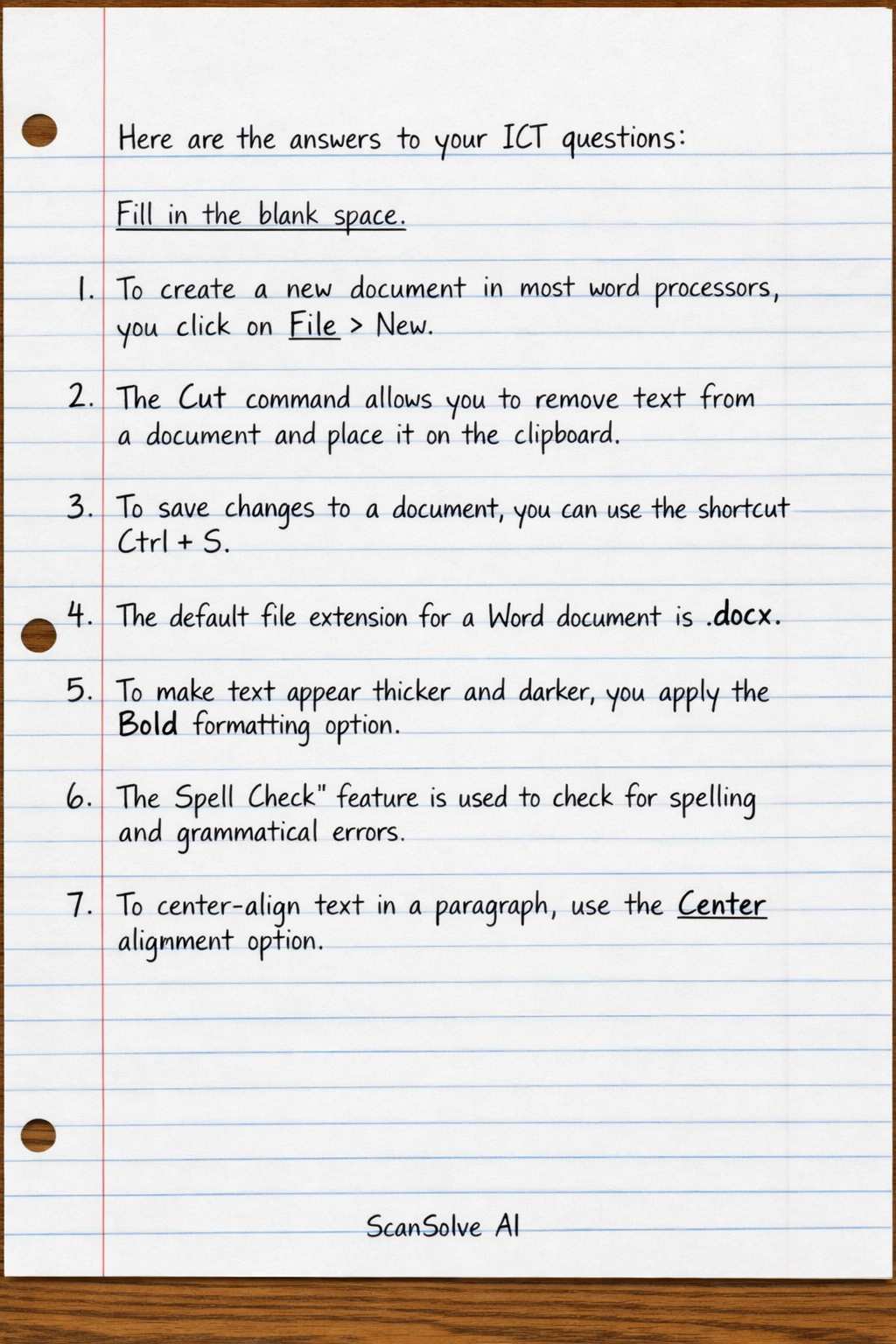
Here are the answers to your ICT questions:
Fill in the blank space
- To create a new document in most word processors, you click on File > New.
- The Cut command allows you to remove text from a document and place it on the clipboard.
- To save changes to a document, you can use the shortcut Ctrl + S.
- The default file extension for a Word document is .docx.
- To make text appear thicker and darker, you apply the Bold formatting option.
- The Spell Check feature is used to check for spelling and grammatical errors.
- To center-align text in a paragraph, use the Center alignment option.
Was this helpful?
Still stuck on this one?
Ask a follow-up, and the answer starts from this question.
Got a different question?Ask your own question
More History Questions
QMatch each part of a computer with its function. 1. CPU 2. Monitor 3. Printer 4. Mouse 5. Keyboard…QWrite down the functions of the following. (a) Printer (b) CPU (c) Hard disk What for the following…QWhat are the answers to the following exercises on Microsoft Word: A. Choose the correct option, B…QPart of a computer that helps a user to put data or information into the computer is called A…QFill in the blanks. a. Computers are used to music. b. Keyboard and mouse are the commonly used devi…
Handwritten Step-by-Step Solution
Get this as a handwritten image on WhatsApp — like a tutor wrote it for you.
Try on WhatsApp