
We read your photo as:
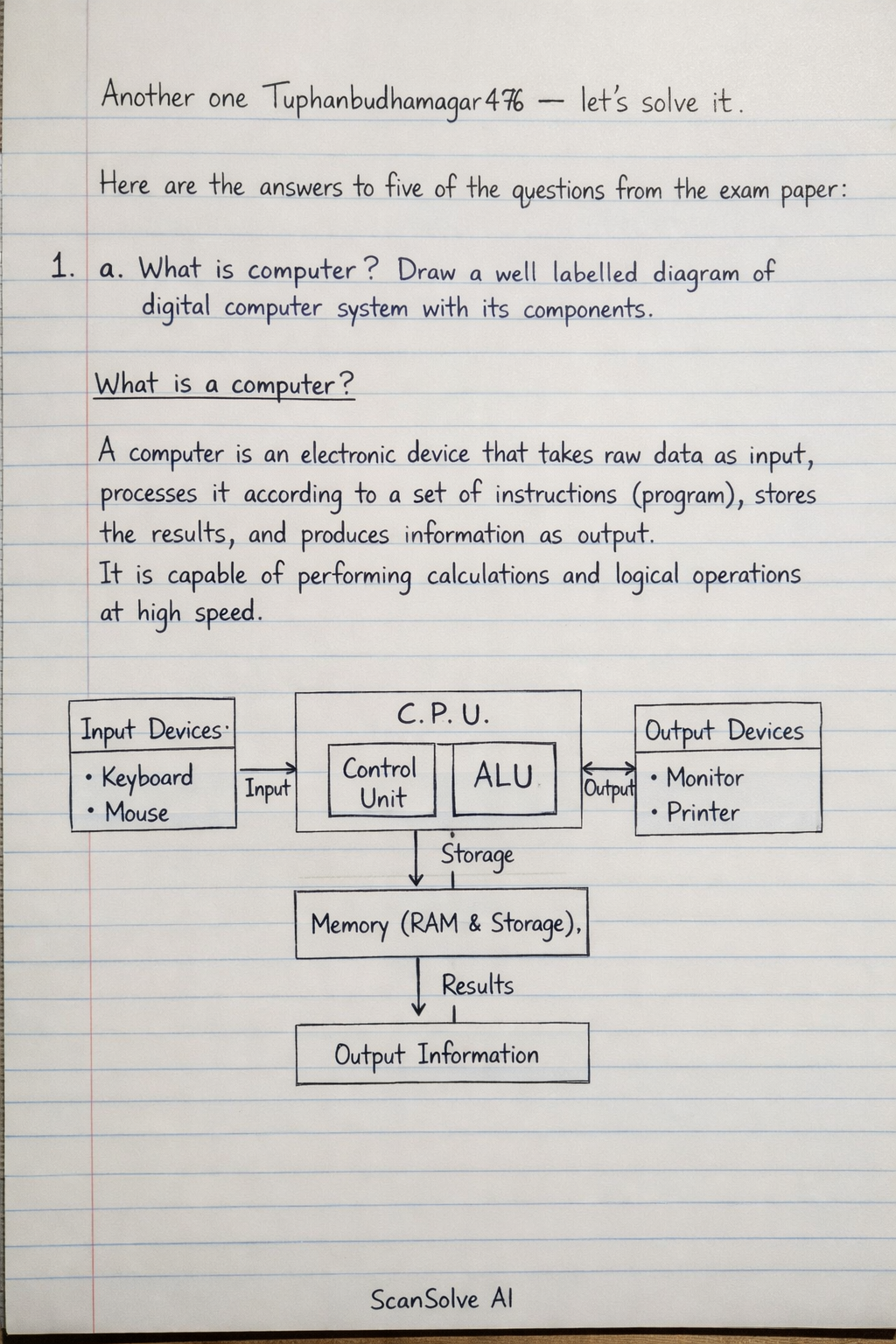
What is a computer? Draw a well labelled diagram of a digital computer system with its components.
ScanSolve AI Answer
Here are the answers to five of the questions from the exam paper:
1. a. What is computer? Draw a well labelled diagram of digital computer system with its components.
-
What is a computer? A computer is an electronic device that takes raw data as input, processes it according to a set of instructions (program), stores the results, and produces information as output. It is capable of performing calculations and logical operations at high speed.
-
Diagram of a Digital Computer System with its Components: A digital computer system typically follows the Von Neumann architecture and consists of the following interconnected components:
- Input Unit: Devices like keyboard, mouse, scanner, etc., used to feed data and instructions into the computer.
- Central Processing Unit (CPU): The "brain" of the computer, responsible for executing instructions and performing calculations. It comprises:
- Arithmetic Logic Unit (ALU): Performs arithmetic and logical operations.
- Control Unit (CU): Manages and coordinates all computer components.
- Registers: Small, high-speed storage for temporary data during processing.
- Memory Unit: Stores data and instructions. It includes:
- Primary Memory (RAM, ROM): For temporary and essential system data.
- Secondary Memory (Hard Drive, SSD): For long-term storage.
- Output Unit: Devices like monitor, printer, speakers, etc., used to display or present processed information.
(Since I cannot draw a diagram, imagine a central box labeled "CPU" with "ALU", "CU", and "Registers" inside. Arrows point from "Input Unit" to "CPU". Arrows point from "CPU" to "Output Unit". Bi-directional arrows connect "CPU" to "Memory Unit" (which branches into "Primary Memory" and "Secondary Memory"). All components are interconnected via a "System Bus".)
2. a. Define operating system. Explain different functions of OS.
-
Define Operating System (OS): An operating system is a software that manages computer hardware and software resources and provides common services for computer programs. It acts as an intermediary between the user and the computer hardware, making the computer usable.
-
Different Functions of OS:
- Process Management: Manages the execution of multiple programs, allocating CPU time and resources.
- Memory Management: Allocates and deallocates memory space to programs, ensuring efficient use of RAM.
- File Management: Organizes, stores, retrieves, and manages files and directories on storage devices.
- Device Management: Controls and coordinates the operation of input/output devices through device drivers.
- Security Management: Provides protection mechanisms against unauthorized access and data breaches.
- User Interface: Offers a way for users to interact with the computer, either through a Graphical User Interface (GUI) or a Command Line Interface (CLI).
3. a. Define text editor. List out the different advantages of using spreadsheet software.
-
Define Text Editor: A text editor is a software program used for editing plain text files. It allows users to create, open, view, modify, and save text documents without any special formatting, making it suitable for writing code, configuration files, or simple notes.
-
Advantages of using Spreadsheet Software:
- Data Organization: Organizes data efficiently in rows and columns.
- Calculations and Formulas: Performs complex calculations using built-in functions and custom formulas.
- Data Visualization: Generates various charts and graphs from data for visual insights.
- Data Analysis: Enables powerful analysis through features like sorting, filtering, and pivot tables.
- Budgeting and Financial Management: Widely used for creating budgets, tracking expenses, and managing financial records.
- Collaboration: Supports real-time collaboration, allowing multiple users to work on the same document.
4. a. What is computer network? Explain various network topologies used in computer networking.
-
What is a computer network? A computer network is a collection of interconnected computers and other hardware devices that can share resources (like printers, files), exchange data, and communicate with each other. The connection can be established through wired or wireless media.
-
Various Network Topologies: Network topology refers to the physical or logical arrangement of nodes and connection lines in a network.
- Bus Topology: All devices connect to a single central cable (bus). Simple to install but a break in the bus affects the entire network.
- Star Topology: All devices connect to a central hub or switch. Easy to manage and add devices; failure of one device doesn't affect others, but central hub failure brings down the network.
- Ring Topology: Each device connects to exactly two others, forming a continuous loop. Data travels in one direction; a single node failure
Still stuck on this one?
Ask a follow-up, and the answer starts from this question.
More Computer Science Questions
Handwritten Step-by-Step Solution
Get this as a handwritten image on WhatsApp — like a tutor wrote it for you.
Try on WhatsApp